Your Phone Has a Free, Hidden Scanning Feature

Table of Contents

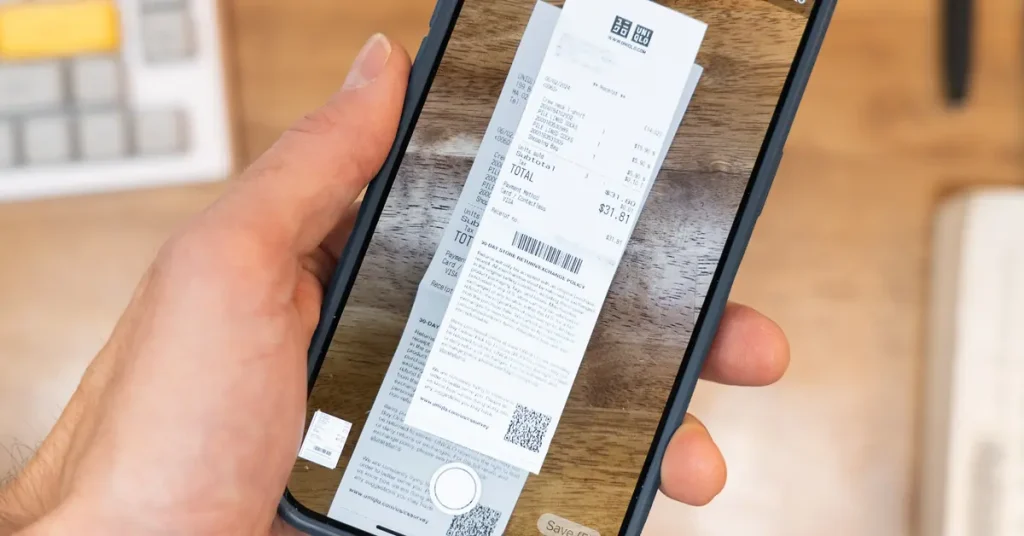
Most people download a separate scanner app without realizing their phone already has a surprisingly good document scanner built in. Both Google Drive and Apple Notes include free hidden scanning tools that can:

  • Detect document edges
  • Auto-crop pages
  • Improve readability
  • Export PDFs instantly

And honestly? They’re good enough for most people.

📱 iPhone Has a Built-In Scanner

📝 Hidden inside the Notes app

https://images.openai.com/static-rsc-4/THx1oUmOUWMx7UJqJIqzIhRyH9HiVNRWG4WHXRy6mAHAK7hrtzqgx_V0Nl2GvetIto7t7cEvF2Gph-2QCa4E7uxKfxLmAFP7eDZZw6mOBQ_smaa_oqzdjLg-xQXvkCwbT5tQJ5PZNu58pYINFsGnRJZdPi2LGfrwkL_N_W96sFaE8EKbv7JTf-NhhhvIjxQk?purpose=fullsize

How to use it:

  1. Open Apple Notes
  2. Create a new note
  3. Tap the paperclip or camera icon
  4. Choose “Scan Documents”

Your iPhone will:

  • Detect paper automatically
  • Capture pages
  • Straighten perspective
  • Save as PDF

👉 No extra app needed.


🤖 Android Has One Too

📂 Google Drive includes a scanner

https://images.openai.com/static-rsc-4/HQN98zRrWI7XYeuET56fthTzDI-4PO3n-pUhtmzOpAoDCNRsDnHzF_kSvS4ezTvEzo51I3wStP2ptcEuD4fplXzPze6k4w6SbcV3l9B3StEiyWOVJFN7evpcpvveRXYfhtd6-2bOAMb3owmb5b2LB6riFm7pdGictmC_7WU0oqMw8RcMY49z7WbM1kclUCfa?purpose=fullsize

How to use it:

  1. Open Google Drive
  2. Tap the + button
  3. Select “Scan”

It automatically:

  • Enhances contrast
  • Crops documents
  • Creates shareable PDFs

👉 Great for receipts, contracts, homework, and forms.


✨ Why Phone Scanners Work So Well Now

📄 AI image processing got dramatically better

https://images.openai.com/static-rsc-4/yTiA15hxo59unbmg8MLtcLGdnW4kjDp7Ww_BMciINLKLKtKfqSaHn8e7qwa2Zd8MM8V9mE39nVUwDEazezcr1ZkEV0inlkf9ro2xwO163BDt9khljJ2qi2rlblAPawI03ukWSLZQUF0jBvQSvYxR_XAO32zV80pIeD3iAhZrtQsxEJ8DnAbqKw6_TxK109fA?purpose=fullsize

Modern phone scanners use:

  • Edge detection
  • Perspective correction
  • Contrast optimization
  • OCR text recognition

👉 That’s why scans now look close to flatbed scanners for everyday use.


🧠 Best Uses for the Hidden Scanner

https://images.openai.com/static-rsc-4/5FBRxUR93FmesZC6qAa7MFTwm5ckQyIwaxo03VH8ZOdjg2dF7elnP68sMhYoPGPOrDU34IQYpfJq3V2cMYWvp0BIJjfa5UPV72CqSdFnD-K-5gBwuS5ktC1q63rks60z74k4UNpJotHI-c2Nuo96LJLlz-1fr2fEM4afl1tkSIlb8zjmj9GB0PkxEWM4l8sG?purpose=fullsize

Perfect for:

  • Signing documents
  • Scanning IDs
  • Receipts and expenses
  • School notes
  • Contracts
  • Old photos

⚡ Pro Tip: Use Natural Lighting

https://images.openai.com/static-rsc-4/js_7DabhvMAh_FOtsbFT2kaJW3a-_AXAaRnMATMCP3hw-Cx2OkaiJhf3HHRmOhtNP0zmpFpfCuPweOmUip5wV8Rkqat7NxfUk1ogKQqe08Cxx5ku4_CwnW5aged-VfaDsK9R9OH6FbwvMF0V_lrP-TnHL4Jqs-JSn_vrkIYdz-1knULYXozlTv4NLWMiKxqO?purpose=fullsize

For cleaner scans:

  • Place documents near a window
  • Avoid overhead glare
  • Keep phone parallel to paper

👉 Lighting matters more than camera megapixels.


🔍 Bonus: Your Phone Can Search Text Too

https://images.openai.com/static-rsc-4/-U9xvTBcyyn3LVRN52FG2cTB1R1AvRsFZ9HuoQRM9EVyBzwFH4PsuBukYBn17xwgLn7Mg8L95OvSGv5SaLUcQ2bSFsA-XtTxWlGV2_M24Cq5ZgS-uFfEasjnmLK4OFM0lNjCF--oyrFvTYENgiWX9VkNCjy7Aqzg8EWe-tBG1xoRtCQAh4YeMfcOwmG8XvjI?purpose=fullsize

Many scans become searchable PDFs.

That means you can:

  • Search names
  • Find addresses
  • Copy text from scanned pages

👉 This feels almost magical once you start using it.


🚫 When You Still Need a Real Scanner

Phone scanners struggle more with:

  • Large photo batches
  • High-end archival quality
  • Color-critical work
  • Thick books/magazines

But for most people?
👉 Your phone is already enough.


✅ Final takeaway

Your phone already has a free hidden scanner that:

  • Creates PDFs
  • Auto-crops documents
  • Improves readability
  • Works shockingly well

And once you start using it, you’ll probably stop downloading random scanner apps forever.
Mortgage

The Best Tote Bags

Why Tote Bags Remain a Must-Have Accessory Tote bags have evolved far beyond simple carryalls. Today, they blend fashion, practicality, and versatility into one everyday

Read More »
Mortgage

The Best Bike Phone Mount

Why Every Cyclist Needs a Reliable Phone Mount Whether you’re commuting through the city, exploring scenic trails, or training for long-distance rides, having your smartphone

Read More »
Health

The Best Walkers

The best walker isn’t one-size-fits-all—it depends on stability, mobility level, weight, and where you’ll use it (indoors vs outdoors). There are two main types: Below

Read More »